

Lookup#
Nmap#
I started the enumeration with RustScan, which quickly identified two open ports:
22– SSH80– HTTP
After identifying the web service on port 80, the next step was to access it through the browser.
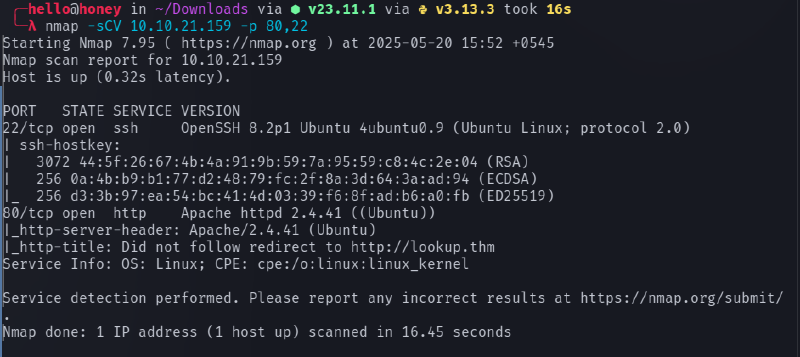
The IP address resolved to the domain lookup.thm, but loading the IP directly did not show the expected content. This indicated that the application was using virtual host routing.
To resolve this, the domain was mapped locally by adding the following entry to /etc/hosts:
<target_ip> lookup.thmAfter adding the entry, the website became accessible via http://lookup.thm.
Feroxbuster#
Initial directory enumeration revealed only a single page:
login.phpSince this was the only visible entry point, further testing focused on the login functionality.

Web Enumeration#
The login page was the primary attack surface. Several SQL injection payloads were attempted, but they failed and produced error responses. Because the injection attempts did not succeed, the next step was credential brute-forcing.
Two tools were used during enumeration:
- Hydra – for credential brute forcing
- FFUF – for fuzzing usernames and passwords
First, attempts were made with the username admin, which returned wrong password responses, suggesting that the username might exist.
Using FFUF to brute force passwords eventually revealed a valid password:
password123However, logging in with admin:password123 produced a new error message:
Wrong username and passwordThis suggested that the password was correct but the username was incorrect.
Therefore, username fuzzing was performed using FFUF, which revealed a valid username:
joseWorking credentials:
jose : password123After logging in successfully, the application dashboard became accessible.


Subdomain Discovery#
After logging in, a new subdomain was discovered:
files.lookup.thmTo access it, another entry was added to /etc/hosts:
<target_ip> files.lookup.thmOnce the subdomain was reachable, it revealed a file management interface containing many files.
Initially, every file was inspected manually, but none of them revealed useful information. This turned out to be a rabbit hole.
While inspecting the URL structure, the presence of elFinder was noticed. Researching the application showed that elFinder is a web-based file manager.
Further investigation revealed the exact version of elFinder, which allowed searching for known vulnerabilities.


Exploitation#
After identifying the vulnerable version of elFinder, a search for available exploits was performed. A suitable exploit was found in Metasploit.
Steps performed:
- Launch Metasploit
- Search for the elFinder exploit module
- Configure the required parameters:
RHOSTRPORTTARGETURILHOSTLPORT
- Run the exploit
After successful execution, a Meterpreter session was obtained.


At this stage, a shell was obtained as:
www-dataPost Exploitation#
While exploring the system, two additional users were discovered:
think
root
To identify potential privilege escalation vectors, SUID binaries were enumerated using:
find / -perm -u=s -type f 2>/dev/null
During the enumeration process, an unusual binary was found:
/usr/sbin/pwmThis binary appeared to execute the id command internally.

PATH Hijacking#
Since the binary used the id command without specifying the full path, it was vulnerable to PATH hijacking.
A malicious id script was created:
echo '#!/bin/bash' > /tmp/id
echo 'echo "uid=33(think) gid=33(think) groups=(think)"' >> /tmp/id
chmod +x /tmp/id
Then the PATH variable was modified so that /tmp would be searched first:
export PATH=/tmp:$PATHRunning the vulnerable binary:
/usr/sbin/pwmThis caused the system to execute /tmp/id instead of the real /usr/bin/id.
As a result, the program revealed a hidden .password file containing password data.
SSH Access#
The extracted password list was transferred to the attack machine and used to brute force SSH access for the user think.
hydra -l think -P ~/thm/lookup/Password ssh://10.10.21.51
This successfully revealed the password for the think user.
Using the credentials, an SSH session was established.
Privilege Escalation#
Running sudo -l revealed that the think user could execute the following binary as root:
/usr/bin/look
The look command can be abused to read arbitrary files.
First, define a variable pointing to the root private key:
LFILE=/root/.ssh/id_rsaThen execute:
sudo /usr/bin/look '' "$LFILE"This command printed the contents of the root SSH private key.
With the private key obtained, SSH access as root became possible, completing the privilege escalation.
Summary#
Attack chain overview:
- Port scan revealed SSH and HTTP
- Virtual host
lookup.thmdiscovered - Login page identified
- Credentials enumerated (
jose : password123) - Subdomain
files.lookup.thmdiscovered - Vulnerable elFinder version identified
- Exploited with Metasploit
- Initial shell as www-data
- PATH hijacking on
/usr/sbin/pwm - Password extraction for think
- SSH access as think
sudo lookabused to read root SSH key- Root access obtained